
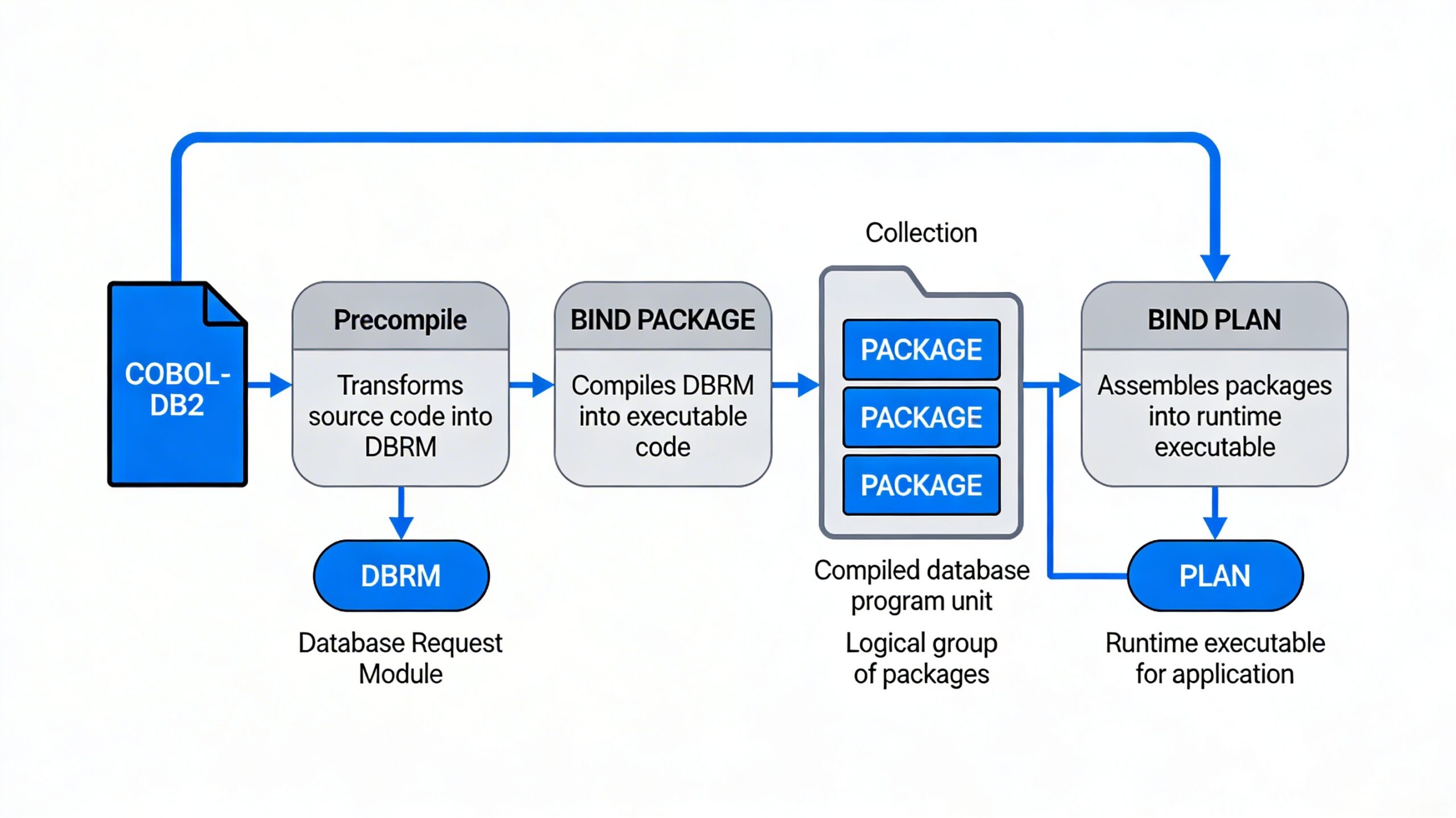
In Db2 for z/OS, the runtime environment (RTE) for an application is shaped by four closely related objects: DBRM, Package, Collection, and Plan. Understanding how they fit together is essential for COBOL‑Db2 and other host language applications, because they determine how SQL is compiled, bound, and executed at run time.
DBRM
When a program containing embedded SQL (for example, COBOL‑Db2) is precompiled, Db2’s precompiler separates the SQL from the host code. The output of this step is:
- Modified source code with Db2 calls replacing the original SQL.
- A Database Request Module (DBRM) that holds the SQL statements extracted from the program.
DBRMs are not executable by themselves; they are intermediate artifacts stored in libraries (for example, PDS members) and serve as input to the BIND process that produces packages and plans.
PACKAGE
A package contains control structures that DB2 uses when it runs SQL statements. It contains executable forms of SQL statements. Packages are stored in the database system catalog tables.
A package is a bound, optimized form of SQL derived from a single DBRM.
- You create packages with the
BIND PACKAGEcommand, which takes a DBRM as input and stores the access path choices and other metadata for that program. - Packages live in the Db2 directory and are referenced by a four‑part name:
location.collection-id.program-name.version. - Each package encapsulates the optimized access paths for that program’s SQL, making it possible to rebind individual programs without touching the rest of the application’s run‑time environment.
IBM documentation describes packages as improving flexibility and maintainability because they allow you to rebind selected DBRMs when statistics or indexes change, rather than rebinding entire application plans.
COLLECTION
A collection is a logical grouping of related packages, usually for a single application or subsystem.
Key points about collections:
- There is no CREATE COLLECTION SQL statement; a collection is created implicitly the first time you bind a package into a collection with that name.
- Collections are identified by collection IDs, often chosen to reflect environments or applications (for example, PAYROLL_DEV, PAYROLL_QA, PAYROLL_PRD).
- New packages are added or replaced in a collection via additional BIND PACKAGE commands pointing to the same collection ID.
Collections mainly exist to simplify managing sets of packages—particularly when you later bind or rebind plans that refer to entire collections instead of listing every package individually.
| Object | Created by | Contains | Stored in | Main purpose |
|---|---|---|---|---|
| DBRM | Precompile of a program | Extracted SQL statements | Data set (PDS/HFS) | Intermediate input to BIND; not executable by itself.ibm+1 |
| Package | BIND PACKAGE |
Bound SQL + access paths for one program | Db2 directory | Fine‑grained, versionable unit of execution; enables flexible rebinds.ibm+2 |
| Collection | Implicit when first package is bound into it | Group of related packages | Db2 directory | Logical grouping to simplify plan PKLIST management.techagilist+1 |
| Plan | BIND PLAN |
References to DBRMs and/or packages and collections | Db2 directory | Entry point that applications execute under at run time.ibm+2 |
DBRM – PLAN
The plan contains the bound, operational, form of the SQL statements from the DBRMs that were built from the application programs. It is created during the BIND process. It has the executable code for the SQL statements in the DBRM. The plan is marked as invalid if the index used by it is dropped. The next time the plan is invoked, it is recreated. An application plan allows application programs to access DB2 data at execution time. It also relates the whole application process to the local instance of DB2 where it will be used.
Object Type: DBRM
Contents: SQL for a source program
Input: Source Program
Command: DB2 Precompile Program (dependent on source language)
Output: DBRM
Authority needed (if not SYSADM): None
Object Type: PACKAGE
Contents: Bound SQL for a source program
A PACKAGE is initially created with the BIND PACKAGE. The actual name of the package is a 4 part name:
location name.collection id.DBRM member name. version where version is determined by precompiler options but is typically a timestamp.Input: DBRMCommand:BIND PACKAGE (location name.collection id)
OWNER (authid of package owner)
QUALIFIER (for unqualified SQL)
MEMBER (DBRM member name)
LIBRARY (DBRM PDS name)
+ additional parameters
Output:
Package residing in the specified collection
Note: Location name does not need to be specified if BIND command executed on same DB2 subsystem as where BIND is taking place
BIND PACKAGE
Complicated, but simplistically, the OWNER must have all:
· SQL authority for all statements in the package
· BINDADD (for new package) or BIND (for the existing package)
· CREATE IN or PACKADM for specified collection
Also, if the Binder is not equal to OWNER, then Binder must be in an ACF2 Source Group containing OWNER
To execute a PACKAGE for a program:
EXECUTE on the PLAN containing the PACKAGE for the program. If executing through DRDA when no PLAN exists on the local DB2 system, then EXECUTE on the PACKAGE or on collection id.* containing the PACKAGE
Object Type: COLLECTION
Contents: A group of bound PACKAGES
A collection is NOT explicitly created (There is no CREATE COLLECTION SQL statement). It is implicitly created the first time a BIND PACKAGE into a collection with that name is executed.
A package is added or replaced in a COLLECTION via the BIND PACKAGE command.
To bind a package in a collection: CREATE IN for the specific collection (+ whatever authorities are needed for the package itself)
Object Type: PLAN
A group of bound DBRMS and/or PACKAGES
A PLAN is initially created via the BIND PLAN statement
DBRMs specified in the BIND PLAN command must already exist
PACKAGES specified in the BIND PLAN command do not need to exist
Input: DBRMs and/or a list of PACKAGES. This list of packages can be wildcarded as described below
Command:
Similar to BIND PACKAGE with the important addition of PKLIST
BIND PLAN (plan name)
OWNER (authid of plan owner)
QUALIFER (for unqualified SQL)
MEMBER (DBRM member name, …)
LIBRARY (DBRM PDS name)
PKLIST (location name.collection id.package id, …) additional parameters
Output:
The BIND PLAN command (for a new PLAN) does two things:
- Any DBRMs specified are bound in the same way that BIND PACKAGE binds DBRMs
- Creates a PLAN object contains all DBRMs specified and the list of packages specified.
Notes on PKLIST (location name.collection id.package id) parameter: - Any or all of location name, collection id, and package id may be wildcarded with *. This allows future BIND PACKAGE (location name.collection id) commands to bind additional packages into the PLAN without needing additional BIND PLANs
- Typically at NEES, BIND PLAN specifies PKLIST (collection id.). This results in location name defaulting to the local location (DB2A or DSNP) and includes ALL packages that are or will ever be bound into a specific collection. Example: The DBA first issues BIND PLAN (PSFTDPLB) PKLIST (PSFTDCOL.) to create a DEV Plan PSFTDPLB to include ALL packages which are or will ever be bound into the DEV Collection PSFTDCOL via
BIND PACKAGE (PSFTDCOL) MEMBER (DBRM member name) LIBRARY (DBRM PDS name) commands
The developer then issues a BIND PACKAGE (PSFTDCOL) MEMBER (PIP250) LIBRARY(TESTPSFT.HRDEV.DRMLIB). This creates a package named DB2A.PSFTDCOL.PIP250.version where version = a timestamp.
BIND PLAN
Complicated, but simplistically, the OWNER must have all:
· SQL authority for all statements in DBRMs specified (this authority is NOT necessary for packages included in the PKLIST since they are already bound)
· BINDADD (for a new plan) or BIND (for the existing plan)
· For explicitly specified packages: EXECUTE authority (or PACKADM) on each explicitly specified package or on collection id.* containing an explicitly specified package
· For collection id.: EXECUTE authority (or PACKADM) on collection id.
Also, if the Binder is not equal to OWNER, then Binder must be in an ACF2 Source Group containing OWNER
To execute a PLAN for a program EXECUTE on the PLAN containing the bound DBRM or PACKAGE for the program.
From a runtime environment (RTE) perspective, the flow looks like this:
-
Source → Precompile → DBRM
-
The precompiler reads embedded SQL and generates DBRMs plus modified source code.
-
-
DBRM → BIND PACKAGE → Package in a Collection
-
Each program’s SQL becomes a package stored under
location.collection.program.version.
-
-
Packages/Collections → BIND PLAN → Plan
-
A plan is bound that references specific packages or entire collections through
PKLIST, optionally also including DBRMs.
-
-
Run time: Application → Plan → Packages
-
The application executes under that plan; Db2 resolves calls to the appropriate packages in the referenced collections.
-
Conclusion
DBRM, Package, Collection, and Plan together define the Db2 runtime environment for applications on z/OS, from compiled SQL to the executable entry point that governs how and where SQL runs. By mastering how DBRMs flow into packages, how collections organize those packages, and how plans tie everything together at run time, mainframe teams gain fine‑grained control over deployment, performance tuning, and environment isolation across DEV, QA, and PROD.
This architecture—though initially complex—pays off in flexibility: it enables versioned rollouts, targeted rebinds, and environment‑specific routing of work, all while keeping the application source code stable.