
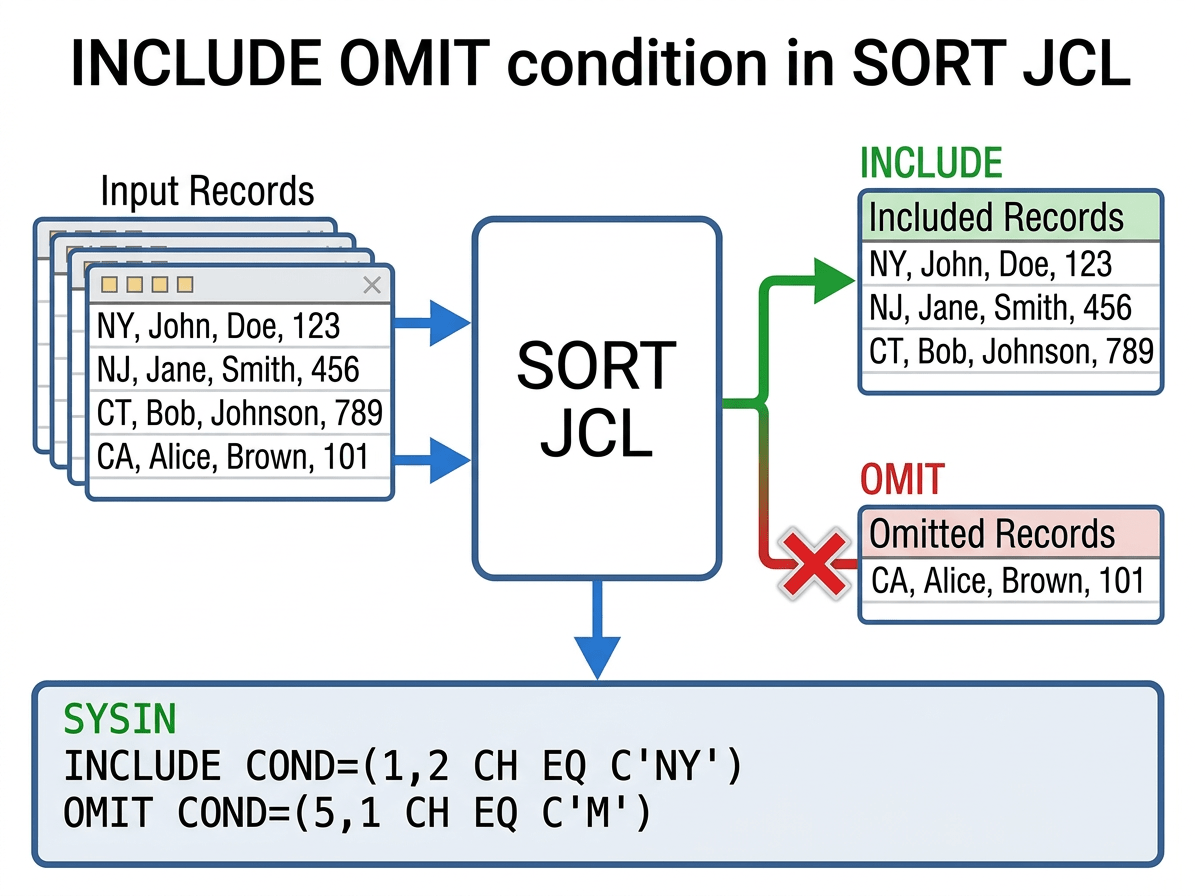
INCLUDE OMIT conditions in SORT JCL (DFSORT, Syncsort) are powerful filters that decide which input records are passed on for sorting, copying, or merging and which are discarded. By pushing this filtering logic into the sort utility, jobs often run faster and more efficiently because unnecessary records are removed before the heavier operations run.
You can use the INCLUDE OMIT statement in conjunction with other options to select/omit the number of records to be processed, which can reduce processor and data transfer time.
At a high level, INCLUDE selects the records you want to keep, while OMIT excludes records you do not want processed.
- INCLUDE: Records that match the condition go to the output; all others are dropped.
- OMIT: Records that match the condition are removed; all others go to the output.
- The INCLUDE and OMIT statements allow you to select records by comparing fields with constants or other fields.
- Only one INCLUDE/OMIT control statement can be specified for an application, either as an INCLUDE or as an OMIT control statement not both.
Functionally, any selection that can be expressed with INCLUDE can also be written with OMIT by inverting the comparison (for example, INCLUDE EQ is equivalent to OMIT NE), but in practice you choose the one that makes the intent clearest.
INCLUDE OMIT
INCLUDE and OMIT are control statements interpreted by DFSORT or Syncsort via SYSIN (or embedded in OPTION/OUTFIL parameters) and are processed very early in the sort phase.
The INCLUDE statement allows a user to select the records to sort or merge from the input file(s):
 INCLUDE COND=(Starting Position,Length,Format,Relational
 Operator,Constant or compare fields)
Example
 SORT FIELDS=COPY
 INCLUDE COND=(1,2,CH,EQ,C'NY',OR,1,2,CH,EQ,C'NJ',
               OR,1,2,CH,EQ,C'CT',OR,1,2,CH,…)  OR
 INCLUDE COND=(1,2,CH,EQ,L(C'NY',C'NJ',C'CT',…))
The OMIT statement selects the records the user does not include. It allows a user to skip certain records from the input file(s) from being sorted or merged. Use the OMIT control statement for any or all input records that are not to appear in the output file.
 INCLUDE COND=(Starting Position,Length,Format,Relational
 Operator,Constant or compare fields)
Example
 SORT FIELDS=COPY
 OMIT COND=(1,2,CH,EQ,C'NY',OR,1,2,CH,EQ,C'NJ',
               OR,1,2,CH,EQ,C'CT',OR,1,2,CH,…)  OR
 OMIT COND=(1,2,CH,EQ,L(C'NY',C'NJ',C'CT',…))
Logical Expression
Specifies one or more logically combined relational conditions, based on fields in the input record. If true, the record is either included in or omitted from the output file, depending on which control statement is being used.
COND=ALL Specifies to include all input records in the output file or to omit all input records from the output file, depending on which control statement is being used.
COND=NONE Do not include any input records in the output file or do not omit any input records from the output file, depending on which control statement is being used.
COND=comparison(s) Specifies one or more comparisons that determine which records are to be included or omitted. Two types of comparisons are possible:
- A standard comparison, between two record fields or between a record field and a constant. A binary input field also allows comparison by bit mask or bit pattern.
- A substring comparison, which allows the search for a constant within a field, or for a field value within a constant, or for a pattern constant (wildcard) within a field. Use SS as the format to indicate a substring comparison.
| Option | Length | Explanation |
| AC | 1 to 256 bytes | EBCDIC translated to ASCII before sort or merge. |
| AQ | 1 to 256 bytes | Character, but alternate collating sequence set by. |
| ASL | 2 to 256 bytes | Leading ASCII separate sign |
| AST | 2 to 256 bytes | Trailing ASCII separate sign |
| BI | 1 to 4092 bytes | Binary |
| CH | 1 to 4092 bytes | Character |
| CLO or OL | 1 to 256 bytes | Leading over punch in 1st 4 bits of field is the sign – X’F’, C, E, or A=Positive, D or B=negative |
| CSF/FS | 1 to 16 bytes | Floating sign format |
| CSL or LS | 1 to 256 bytes | Leading EBCDIC separate sign |
| CST or TS | 1 to 256 bytes | Trailing EBCDIC separate sign |
| CTO/OT | 1 to 256 bytes | Zoned decimal, trailing over punch in 1st 4 bits of rightmost byte is the sign X’F’, C, E, or A=Positive, D or B=negative (CTO forces CMP=CLC parm) |
| FI | 1 to 256 bytes | Fixed point binary |
| FL | 2 to 16 bytes | Normalized floating point |
| PD | 1 to 256 bytes | Packed signed decimal |
| PD0 | 2 to 8 bytes | Packed decimal. first digit and trailing sign ignored. Used for century window processing. |
| SS | Substring | Only allowed for substring comparison tests. |
| Y2B | 1 byte | 2 digit binary year treated as a 4-digit year by CENTWIN processing. |
| Y2C | 2 byte | 2-digit character treated as a 4-digit year by CENTWIN processing. |
| Y2D | 1 byte | 2-digit packed decimal treated as a 4-digit year by CENTWIN processing. |
| Y2P | 2 byte | 2-digit packed decimal treated as a 4-digit year by CENTWIN processing. First digit and trailing sign ignored. |
| Y2S | 2 byte | 2-digit character or zoned decimal treated as a 4-digit year by CENTWIN processing. |
| Y2Z | 2 byte | 2-digit zoned decimal treated as a 4-digit year by CENTWIN processing. Zones are ignored. |
| ZD | 1 to 256 bytes | Zoned decimal, trailing overpunch in 1st 4 bits of rightmost byte is the sign X’F’, C, E, or A=Positive, D or B=negative. |
Relational Condition
The relational condition specifies to perform a comparison or bit logic test. Relational conditions may be combined with AND or OR to form a logical expression. If combined, the following rules apply:
- AND statements evaluated before OR statements, unless using parentheses to change the order of evaluation.Expressions inside parentheses are always evaluated first.Nesting parentheses limited only by amount of available storage.
- Symbols for AND (&) and OR (|) can be used in place of the words.
The comparison operators represent the following conditions:
| Option | Explanation |
| EQ | Equal to |
| NE | Not equal to |
| GT | Greater than |
| GE | Greater than or equal to |
| LT | Less than |
| LE | Less than or equal to |
| BO (or ALL) | All mask bits are 1s (ON) in the input field |
| BM (SOME) | Some but not all mask bits are 1s (ON) in the input field |
| BZ (NONE) | None of the mask bits is 1 (ON) in the input field |
| BNO (NOTALL) | Some or no mask bits are 1s (ON) in the input field |
| BNM (NOTSOME) | All or no mask bits are 1s (ON) in the input field |
| BNZ (NOTNONE) | All or some mask bits are 1s (ON) in the input field |
Some additional information to know about INCLUDE and OMIT control statements is:
- Floating point compare fields cannot be referenced in either control statement.
- Both control statements are mutually exclusive with the other:
- INCLUDE control statements are mutually exclusive with OMIT control statements.
- OMIT control statements are mutually exclusive with INCLUDE control statements.Any selection can be performed with either an INCLUDE or an OMIT control statement.In the compare fields and decimal self-defining term, +0, 0, and –0 are treated as the same number and compare equal.
- If several relational conditions are joined with a combination of AND and OR logical operators, the AND logical expression is evaluated first.The order of evaluation can be changed by using parentheses inside the COND logical expression.
- If any changes are made to record formats by the E15 or E32 user exit routines, the INCLUDE or OMIT control statement must apply to the newest formats.