
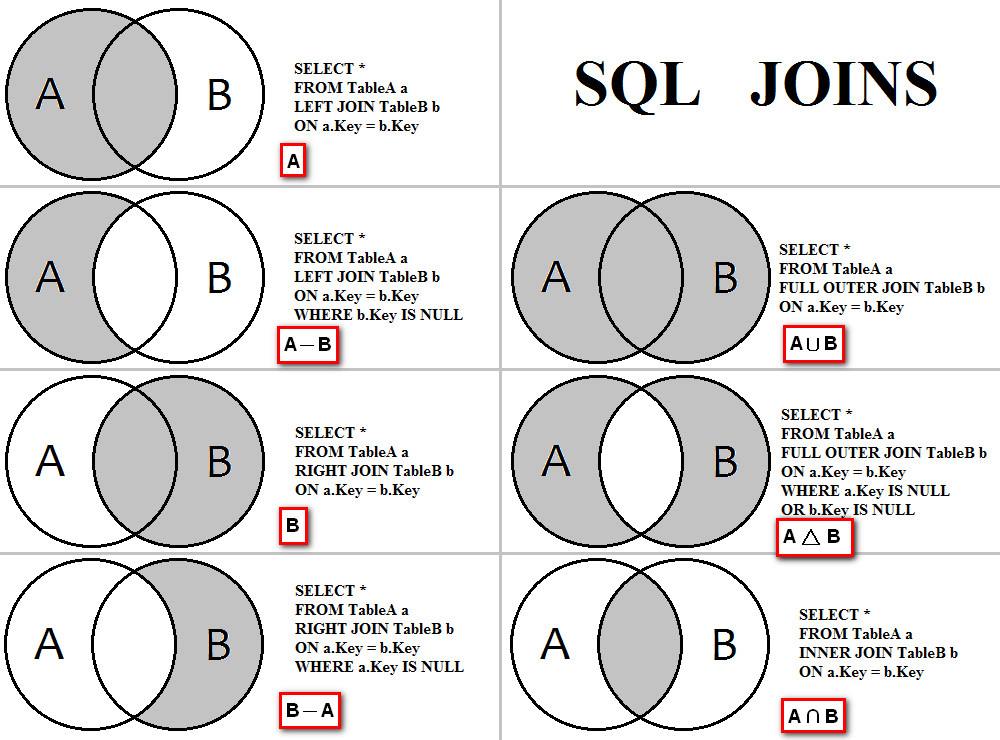
Among SQL JOIN, the OUTER JOIN category includes LEFT JOIN, RIGHT JOIN, and FULL OUTER JOIN. These joins allow retrieving unmatched rows, which INNER JOIN discards when no match is found. When using OUTER JOINS, rows from one or both tables are returned even if there is no corresponding match in the other. This is particularly useful for identifying missing relationships and for performing comprehensive data analysis where completeness is key.
Key Benefit: OUTER JOINS return all rows from at least one table, ensuring that even records with no match are not excluded from the result set. This makes it valuable for reporting, auditing, and full-spectrum data views.
Types of SQL JOINs
- INNER JOINs: Returns only rows with matching values in both tables.
- LEFT OUTER JOINs: Returns all rows from the left table, and the matched rows from the right table. NULL where no match exists.
- RIGHT OUTER JOINs: Returns all rows from the right table, and the matched rows from the left table. NULL where no match exists.
- FULL OUTER JOINs: Returns rows when there is a match in either table, including unmatched rows from both sides with NULLs where appropriate.
Inner Join vs Outer Join
Unlike INNER JOIN, which excludes unmatched rows, OUTER JOIN ensures all relevant data is included. It returns every row from one or both tables, even if no match exists. This helps provide a full data picture, especially when analyzing optional relationships or missing data scenarios.
Syntax
SELECT ColumnList
FROM EmployeeName AS L
LEFT/RIGHT/FULL OUTER JOIN Position AS R
ON L.Column = R.Column;
Understanding the Output
- Returns all matching rows as per the join condition defined using the
ONclause. - Includes non-matching rows from the specified table(s) with NULLs filled in for missing values.
- Enables combining partial datasets for unified reporting.
Additional Notes:
-
- Inner joins are the most common type of join and are used when you only want to include rows where there is a match in both tables.
- Left outer joins are useful when you want to see all the data from the left table, even if there is no matching row in the right table.
- Right outer joins are useful when you want to see all the data from the right table, even if there is no matching row in the left table.
- Full outer joins are useful when you want to see all the data from both tables, regardless of whether there is a matching row in the other table.
Optimize Outer Joins in the COBOL DB2 Program – Click Here
Left Outer Join
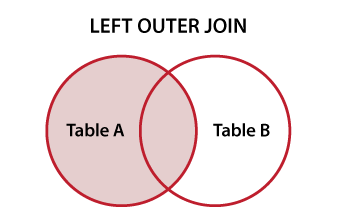
At its core, a left outer join is a method for combining rows from two or more tables based on a related column between them. Unlike inner joins, which only return rows that have matching values in both tables, a left outer join returns all rows from the left table (referred to as the “left” or “first” table) and matching rows from the right table (referred to as the “right” or “second” table). If there is no match in the right table, NULL values are returned for the columns from the right table.
SELECT column_names
FROM table1
LEFT OUTER JOIN table2
ON table1.column_name = table2.column_name;
Input Data
 EmployeeName Table-(T1)Position Table-(T2)
  ID     NAME           ID     TITLE         TEAMSIZE
  10     Sandy          20     Sales Mgr        5
  20     Sam            30     Clerk           10
  30     Cindy          30     Manager          2
                        40     Sales Rep        7
                        50     Sr. Manager.    11

 Query
 SELECT T1.NAME,
        T1.ID,
        T2.ID,
        T2.TITLE,
        T2.TEAMSIZE
 FROM EmployeeName T1
 LEFT OUTER JOIN Position T2
 ON T1.ID = T2.ID
 ORDER BY T1.ID
        , T2.TITLE;

 Result
 ID   NAME     ID     TITLE        TEAMSIZE
 10   Sandy    --     ---------    ---------
 20   Sam      20     Sales Mgr     5
 30   Cindy    30     Clerk        10
 30   Cindy    30     Manager.      2
Suppose we want to return the employee with no title. To do that, add a WHERE clause to include only rows with nulls from the Position table.
Query using ON or WHERE
 SELECT T1.NAME,
        T1.ID,
        T2.ID,
        T2.TITLE,
        T2.TEAMSIZE
 FROM EmployeeName T1
 LEFT OUTER JOIN Position T2
 ON T1.ID = T2.ID
 AND T2.TITLE IS NULL

 SELECTT1.NAME,
        T1.ID,
        T2.ID,
        T2.TITLE,
        T2.TEAMSIZE
 FROMEmployeeName T1
 LEFT OUTER JOINPosition T2
 ONT1.ID=T2.ID
 WHERE T2.TITLE IS NULL

Both the above queries will give the same result.
Result
 ID   NAME     ID     TITLE       TEAMSIZE
 10   Sandy    --     ---------   ---------
Right Outer Join
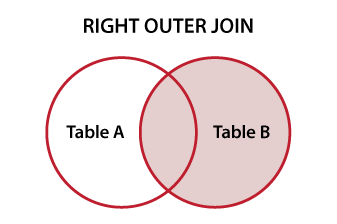
A right outer join, also known as a right join, merges rows from two or more tables based on a related column between them. Unlike inner joins, right joins return all rows from the right table and only matching rows from the left table. If there is no match in the left table, NULL values are returned for those columns.
SQL Syntax Example
SELECT column_names
FROM table1
RIGHT OUTER JOIN table2
ON table1.column_name = table2.column_name;
Sample Tables
EmployeeName Table (T1)           Position Table (T2)
ID    NAME             |     ID    TITLE           TEAM
10    Sandy            |     20    Sales Mgr       5
20    Sam              |     30    Clerk           10
30    Cindy            |     30    Manager         2
                       |     40    Sales Rep       7
                       |     50    Sr. Manager     11
Query
SELECT T1.NAME,
       T1.ID,
       T2.ID,
       T2.TITLE
FROM EmployeeName T1
RIGHT OUTER JOIN Position T2
ON T1.ID = T2.ID
ORDER BY T1.ID, T2.TITLE;
Result
ID    NAME     ID    TITLE
20    Sam      20    Sales Mgr
30    Cindy    30    Clerk
30    Cindy    30    Manager
--    -----    40    Sales Rep
--    -----    50    Sr. Manager
Suppose we want to return only the employees with no title. To achieve this, we can add a WHERE clause to filter only NULLs from the EmployeeName table.
Query using ON or WHERE
-- Using AND in ON clause
SELECT T1.NAME,
       T1.ID,
       T2.ID,
       T2.TITLE
FROM EmployeeName T1
RIGHT OUTER JOIN Position T2
ON T1.ID = T2.ID
AND T1.NAME IS NULL;

-- Using WHERE clause
SELECT T1.NAME,
       T1.ID,
       T2.ID,
       T2.TITLE
FROM EmployeeName T1
LEFT OUTER JOIN Position T2
ON T1.ID = T2.ID
WHERE T1.NAME IS NULL;
Result
ID    NAME     ID    TITLE
--    -----    40    Sales Rep
--    -----    50    Sr. Manager
Full Outer Join
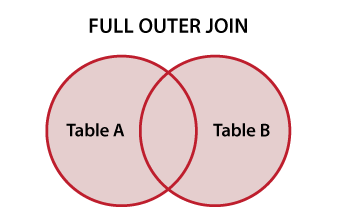
A full outer join, also known simply as a full join, merges rows from two tables based on a related column. Unlike inner joins, it returns all rows from both tables. Inner joins only return matching rows, while outer joins (left and right) include all rows from one table and matching ones from the other. Full outer joins return NULL values where no match is found in either table.
SELECT column_names
FROM table1
FULL OUTER JOIN table2
ON table1.column_name = table2.column_name;
Input Data
EmployeeName Table-(T1)       Position Table-(T2)
ID   NAME             ID   TITLE         TEAM
10   Sandy            20   Sales Mgr     5
20   Sam              30   Clerk         10
30   Cindy            30   Manager       2
                      40   Sales Rep     7
                      50   Sr. Manager   11

Query
SELECT T1.NAME,
       T1.ID,
       T2.ID,
       T2.TITLE
FROM EmployeeName T1
FULL OUTER JOIN Position T2
ON T1.ID = T2.ID
ORDER BY T1.ID,
         T2.ID,
         T2.TITLE;

Result
ID   NAME     ID   TITLE
10   Sandy    --   ---------
20   Sam      20   Sales Mgr
30   Cindy    30   Clerk
30   Cindy    30   Manager
--   -----    40   Sales Rep
--   -----    50   Manager
Suppose we want to return only employees with ID < 30. To do that, we can add a WHERE clause to filter rows from the EmployeeName table.
Query using ON or WHERE
SELECT T1.NAME,
       T1.ID,
       T2.ID,
       T2.TITLE
FROM EmployeeName T1
FULL OUTER JOIN Position T2
ON T1.ID = T2.ID
AND T1.ID < 30
ORDER BY T1.ID,
         T2.ID,
         T2.TITLE;

Result
ID   NAME     ID   TITLE
10   Sandy    --   ---------
20   Sam      20   Sales Mgr
In this example, the condition T1.ID < 30 is used within the JOIN clause. It does not eliminate rows but limits which records are considered matching.
SELECT T1.NAME,
       T1.ID,
       T2.ID,
       T2.TITLE
FROM EmployeeName T1
FULL OUTER JOIN Position T2
ON T1.ID = T2.ID
WHERE T1.ID < 30
ORDER BY T1.ID,
         T2.ID,
         T2.TITLE;

Result
ID   NAME     ID   TITLE
10   Sandy    --   ---------
20   Sam      20   Sales Mgr
30   Cindy    --   ---------
--   -----    30   Clerk
--   -----    30   Manager
--   -----    40   Sales Rep
--   -----    50   Manager